DPM, Windows Server Backup and "The backup storage location is invalid" error..
While working with DPM, I came across an issue, where my internal backup of the DPM server, kept failing with "DPM cannot create a backup because Windows Server Backup (WSB) on the protected computer encountered an error (WSB Event ID: 546, WSB Error Code: 0x10851A0). (ID 30229 Details: Internal error code: 0x80990ED0)"
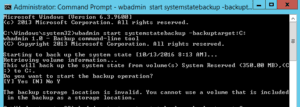
Upon closer inspection, when I launch an admin command prompt and attempt to perform a local backup using wbadmin:
 The solution to this issue, is to simply add a new key to the registry.
Create the following:
The solution to this issue, is to simply add a new key to the registry.
Create the following:
 Immediately after creating the key, the backups should complete successfully.
wbadmin start systemstatebackup -backupTarget:c:I receive the following error: The backup storage location is invalid. You cannot use a volume that is included in the backup as a storage location.
The solution to this issue, is to simply add a new key to the registry.
Create the following:
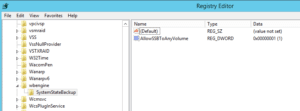
HKEY_LOCAL_MACHINE\SYSTEM\CurrentControlSet\Services\wbengine.
 Create a key called "SystemStateBackup"
 Set the value of this entry as follows:
 Name: AllowSSBToAnyVolume
 Data type: DWORD
 Value data: 1
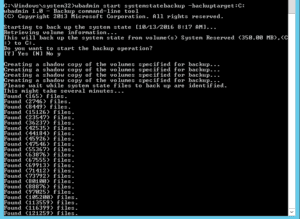
Immediately after creating the key, the backups should complete successfully.
Tags:
0 Comments
Leave a Comment